How to Create a New Clash of Clans Account: Step-by-Step Guide
Clash of Clans (COC) is a top-rated strategy game where players build villages, train troops, and defend their bases from enemies. With gems, gold, elixir, and other resources, the game is highly engaging. Many players want to start fresh or manage multiple accounts. This guide will show you exactly how to create a new Clash of Clans account on both Android and iOS.
Why Create a New Clash of Clans Account ?
Starting a new COC account has several advantages:
Step-by-Step Guide
- Replay the early game challenges: Enjoy starting from scratch.
- Test new strategies: Experiment with new tactics to grow your village faster.
- Manage multiple accounts: Play multiple villages for fun or practice.
- Switch devices or lost old account: Start fresh on a new device safely.
Requirements
Before creating a new account:
- Google account (Android) or Apple Game Center account (iOS).
- Stable internet connection.
- Log out of previous account if starting fresh.
For Android Users
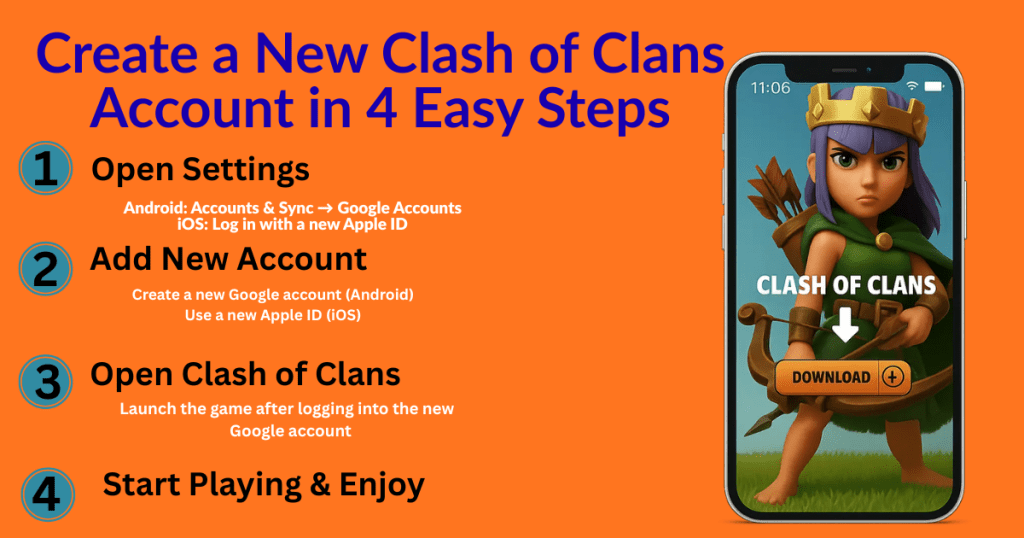
- Open Settings on your device.
- Go to Accounts & Sync > Google Accounts.
- Tap Add Account to create a new Google account, or select an existing one.
- Open Clash of Clans.
- Log in with your new Google account.
- Your new COC village will be ready to play.
For iOS Users
- Sign in with a new Apple ID.
- Launch Clash of Clans.
- Start playing with your new account immediately.
Important Tips
- Do not delete your old account. You can switch accounts using:
- Google Play Games (Android)
- Game Center (iOS/Mac)
- Supercell ID, which allows multiple accounts to be linked and switched safely.
- Linking your accounts ensures no progress is lost.
FAQs – Clash of Clans New Account
Q1: Can I play multiple Clash of Clans accounts on one device?
Yes, using Google Play Games (Android) or Game Center (iOS), you can switch between multiple accounts easily.
Q2: Is it safe to create a new COC account?
Absolutely! It’s safe as long as you link your account to a Supercell ID to avoid losing progress.
Q3: Can I use my old strategies on a new account?
Yes, starting fresh lets you experiment with new tactics while applying strategies you learned from your old village.
Q4: What should I do if I lost my old account?
You can create a new account and continue playing. To recover old accounts, contact Supercell support.
Q5: Do I need a stable internet connection to create a new account?
Yes, a stable connection ensures smooth account creation and prevents errors during login.
Final Thoughts
Creating a new Clash of Clans account is easy, fun, and safe. Whether you’re trying new strategies, managing multiple villages, or starting fresh on a new device, linking your accounts to Supercell ID ensures your progress is secure. Plan carefully, build smart, and enjoy your new village!